 English
- All
- Product Name
- Product Keyword
- Product Model
- Product Summary
- Product Description
- Multi Field Search
English


Views: 0 Author: Site Editor Publish Time: 2025-12-24 Origin: Site


Are you struggling with uneven cuts from your copy paper cutting machine? Maintaining your machine is crucial for optimal performance. The blade plays a vital role in ensuring clean cuts and efficiency. In this guide, we’ll walk you through the step-by-step process of replacing the blade, featuring insights from trusted brands like CHM.
A copy paper cutting machine is essential for businesses that require precise cutting of paper products. It allows users to achieve clean, uniform cuts quickly and efficiently. There are various types of these machines, including:
● Manual Cutters: Operated by hand, these machines are great for small jobs and offer control over each cut.
● Semi-Automatic Cutters: These machines require some manual input but automate the cutting process, making them faster than manual options.
● Automatic Cutters: Fully automated, these machines can handle large volumes of paper, ideal for high-demand environments.
One standout model is the CHM-A4-4, known for its versatility. It adapts to different paper sizes and types, making it a favorite among print shops and offices.
Understanding the main components of a copy paper cutting machine is crucial for effective operation. Here are the key parts:
1. Blade: The cutting edge that performs the actual slicing.
2. Knife Holder: Holds the blade securely in place during operation.
3. Support Ring: Provides stability and support to the blade, ensuring precise cuts.
4. Protective Cover: Safeguards users from the sharp blade when the machine is not in use.
Component | Function |
Blade | Cuts paper with precision |
Knife Holder | Secures the blade for stability |
Support Ring | Prevents blade movement during cutting |
Protective Cover | Ensures safety when not in operation |
The CHM machines feature a patented detachable blade structure, allowing for easy blade replacements. This innovation reduces downtime and ensures that users can maintain their equipment efficiently.
Recognizing when to replace the blade is vital for maintaining a copy paper cutting machine's performance. Here are some common indicators:
● Jagged Edges: If your cuts are no longer smooth, it’s a sign the blade is dull.
● Uneven Cuts: Inconsistent cutting can lead to wasted materials and increased frustration.
● Paper Jams: A worn blade may struggle to cut through paper, causing jams.
Using a dull blade can lead to more than just poor cuts. It can result in increased waste and higher operational costs. Regular inspections are recommended to catch wear early. Check the blade every few weeks, especially if you’re cutting large volumes of paper. Keeping an eye on these signs helps ensure your machine runs smoothly and efficiently.
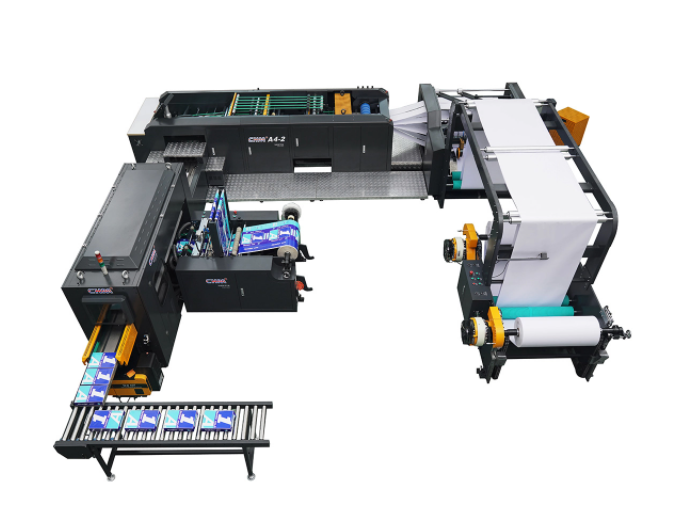
When working with a copy paper cutting machine, safety should always come first. Blade replacement involves handling sharp components that can cause serious injuries if not managed properly. Potential hazards include accidental cuts, which can lead to blood loss and infections, and electrical hazards if the machine is still connected to a power source.
Following established safety protocols is crucial. For instance, always ensure that the machine is turned off and unplugged before starting any maintenance work. This simple step can prevent accidents and protect you from harm. Additionally, it’s important to be aware of your surroundings while working. Keeping the area clean and free from clutter can reduce the risk of slips and falls, which are common in workshop environments.
Wearing the right safety gear is another vital aspect of blade replacement. Here’s a list of recommended items:
● Cut-Resistant Gloves: These protect your hands from sharp blades while allowing for dexterity.
● Safety Goggles: Protect your eyes from debris that may fly during blade installation.
● Steel-Toed Boots: These can prevent foot injuries in case heavy parts drop.
Using the correct tools is just as important as wearing safety gear. For example, having screwdrivers that are compatible with your specific copy paper cutting machine, like those from CHM, ensures that you can efficiently and safely remove the blade. Here’s a quick reference table for essential tools and their purposes:
Tool | Purpose |
Screwdriver | To loosen and tighten blade fasteners |
Allen Wrench | For machines that require hex screws |
Blade Holder | To safely handle and replace the blade |
By equipping yourself with the right safety gear and tools, you can significantly reduce the risks associated with blade replacement. Remember, taking these precautions not only protects you but also ensures the longevity of your copy paper cutting machine.
Before diving into the blade replacement process, it's essential to set up a clean and organized workspace. A tidy area not only boosts efficiency but also enhances safety. Start by clearing a flat surface where you can comfortably work. Ensure you have the following tools within reach:
Tool | Purpose |
Screwdriver | For loosening and securing the blade. |
Clean Cloth | To wipe down surfaces and remove any debris. |
Container for Blade Disposal | A dedicated area for safely discarding the old blade. |
Having a specific spot for blade disposal is crucial. It prevents accidental cuts and keeps your workspace safe. Additionally, consider using a mat or cloth to protect your work surface from scratches. Organizing your tools in a way that minimizes movement can also help maintain focus and prevent accidents.
Safety is paramount when working on a copy paper cutting machine. Always start by turning off the machine and unplugging it from the power source. This simple step prevents any accidental starts while you’re replacing the blade. To ensure the machine is completely powered down, check for any lights or indicators that might suggest it’s still on.
Safety Check | Action |
Turn Off Machine | Ensure the power switch is off. |
Unplug from Outlet | Disconnect the power cord from the outlet. |
Check Indicators | Look for any lights or sounds indicating power. |
If your machine has a battery backup, make sure to remove that as well. Taking these precautions ensures that you can work confidently without the risk of unexpected movements from the machine.
Next, locate the protective cover of your machine. This cover is designed to keep the blade safe from accidental contact. Carefully remove it by following these steps:
1. Identify any screws or clips holding the cover in place.
2. Use your screwdriver to loosen these fasteners.
3. Gently lift the cover off and set it aside in a safe spot to avoid scratches or damage.
Component | Description |
Protective Cover | Shields the blade from accidental contact. |
Fasteners | Screws or clips that secure the cover. |
Safe Storage Area | Keeps the cover protected when not in use. |
When setting the cover aside, consider placing it on a soft surface, like a cloth, to prevent any scratches. This small step can prolong the life of the protective cover.
With the protective cover removed, you can now access the blade. Take a moment to locate the blade and its fixed part. Understanding the blade's positioning is essential for proper installation later. If your machine has a manual, refer to it for diagrams that illustrate where everything is located. Knowing how the blade fits into the machine will help ensure that you align the new blade correctly.
Now it’s time to remove the old blade. Here’s how to do it safely:
1. Loosen the Fasteners: Use your screwdriver to carefully unscrew the fasteners holding the blade in place.
2. Remove the Blade: Once loose, gently pull the blade out from its holder.
3. Dispose of the Old Blade: Place the old blade in the designated disposal container. This prevents injuries and keeps your workspace safe.
Disposal Method | Description |
Sharp Blade Disposal | Use a puncture-resistant container. |
Recycling | Check local guidelines for blade recycling. |
Safe Handling | Always handle blades with care to avoid cuts. |
By following these steps, you can ensure that the old blade is removed safely and disposed of properly, minimizing risks associated with sharp objects.
Selecting the right replacement blade is crucial for optimal performance. Focus on CHM-compatible blades for best results. To install the new blade, follow these steps:
1. Align the Blade: Position the new blade in the holder, ensuring the cutting edge faces the correct direction.
2. Secure the Blade: Tighten the fasteners firmly, making sure the blade is held securely in place.
3. Double-Check Alignment: Before moving on, double-check that the blade is correctly aligned and securely fastened.
Installation Check | Action |
Blade Alignment | Ensure the cutting edge is facing the right direction. |
Fastener Tightness | Confirm all screws are tightened securely. |
Blade Positioning | Verify that the blade sits correctly in the holder. |
Proper installation is vital for the machine's performance. A misaligned blade can lead to poor cutting results and increase wear on the machine.
With the new blade in place, it’s time to put the protective cover back on. Follow these instructions:
1. Position the Cover: Align the cover with the machine, ensuring it fits snugly over the blade.
2. Secure It: Use the screws or clips to fasten the cover back in place, making sure it’s tight to prevent any movement.
Finally, it’s time to power the machine back on. Plug it in and turn it on, ensuring everything is functioning as expected. Conduct a test run by cutting a few sheets of paper to verify the blade's effectiveness. Here are some tips for testing:
● Use Different Paper Types: Try cutting various types of paper to see how well the new blade performs.
● Check for Smoothness: Make sure the cuts are clean and precise, indicating that the blade is installed correctly.
Testing Criteria | Description |
Paper Types | Test with different thicknesses and textures. |
Cut Quality | Look for smooth, even cuts without tearing. |
Machine Performance | Listen for unusual sounds during operation. |
By following these steps, you’ll ensure that your copy paper cutting machine operates at its best, providing clean cuts and extending the life of your equipment.
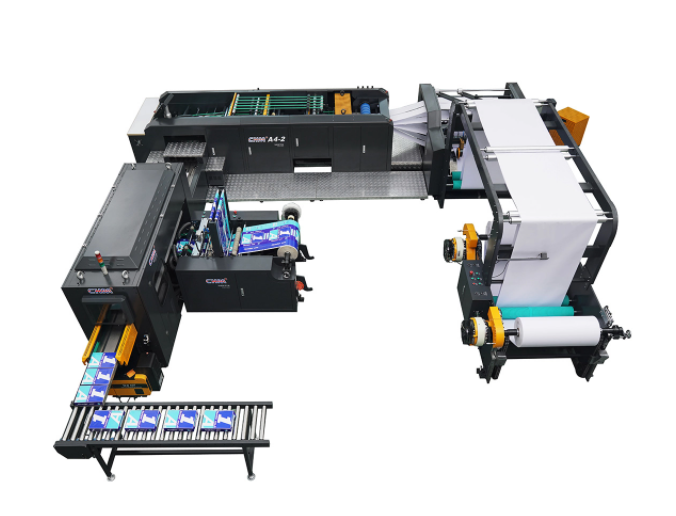
Regular inspections and maintenance are crucial for the longevity and performance of your copy paper cutting machine. Performing routine checks on the blade condition and overall machine performance can help prevent issues before they escalate. Here’s why it matters:
● Blade Condition: Inspect the blade for dullness or damage. A sharp blade ensures clean cuts and reduces strain on the machine.
● Machine Performance: Listen for unusual sounds and check for any irregularities during operation. Early detection can save time and money.
To keep your machine in top shape, consider implementing a maintenance schedule. Here’s a suggested timeline:
Maintenance Task | Frequency |
Blade Inspection | Every week |
Cleaning the Machine | After each use |
Lubrication of Moving Parts | Monthly |
Regular cleaning and lubrication are essential. Lubricate moving parts to ensure smooth operation and prevent wear.
Keeping your copy paper cutting machine clean is vital for maintaining its performance. After each use, follow these best practices for cleaning:
1. Turn Off and Unplug: Always ensure the machine is powered down before cleaning.
2. Wipe Down Surfaces: Use a clean, dry cloth to remove dust and paper debris from the cutting area.
3. Check the Blade Housing: Make sure to clean around the blade housing to prevent buildup that could affect cutting quality.
Cleaning Step | Description |
Surface Wiping | Use a dry cloth to remove dust and debris. |
Blade Area Cleaning | Pay special attention to the blade housing. |
Regular Maintenance | Schedule deep cleaning every month. |
Maintaining a clean cutting area is essential. A cluttered workspace can lead to poor cuts and even accidents. Keeping the area free of debris ensures that the machine operates efficiently and safely.
Proper storage of replacement blades is critical, especially for brands like CHM. Here are some tips for safely storing spare blades:
● Use Protective Cases: Store blades in protective cases to prevent accidental cuts and damage.
● Keep in a Dry Environment: Moisture can lead to rust, so ensure blades are stored in a dry place. A cabinet with silica gel packets can help absorb moisture.
Storage Tip | Purpose |
Protective Cases | Prevents accidental cuts and blade damage. |
Dry Environment | Reduces the risk of rust and corrosion. |
Labeling | Clearly label cases to identify blade types. |
By following these storage tips, you can extend the life of your replacement blades and ensure they are ready for use when needed. Proper maintenance and care for your copy paper cutting machine will enhance its performance and reliability over time.
Replacing the blade in your copy paper cutting machine is crucial for optimal performance. Regular blade maintenance ensures clean cuts and extends the machine's life.
Follow this guide for safe and effective blade replacement. If you have any experiences or questions, feel free to share them in the comments. Your insights can help others in the community!
A: Replace the blade every 2-3 months or when cuts become uneven.
A: No, always use manufacturer-recommended blades for optimal performance.
A: Check alignment and ensure the blade is securely installed.
A: Yes, brands like CHM are highly recommended for their quality.
A: Perform regular maintenance, keep it clean, and follow proper usage guidelines.


